Microsoft’s New Mac vs. PC Hyperbole

From Rene Ritchie at iMore:

Microsoft has three new Surface Pro 3 ads out today that, as promised, switch from trying to attack the iPad to trying to attack the MacBook Air. Given how heart-breakingly, bank-breakingly unsuccessful Surface has been to date, it’s hard not to sympathize. It’s also hard not to think repeating past strategic failures will only result in more failures. Instead of shifting from iPad to MacBook, maybe Microsoft should shift from attacking Apple to attacking the PC market?

Mac sales were up 18 percent year-over-year last quarter. The Mac has grown 32 out of the last 33 quarters. That’s against Windows PC sales that continue to be on the decline.

It’s incredibly tough to imagine anyone would leave a MacBook Air for a Surface Pro 3. More specifically, that they’d leave the ability to run OS X on hardware of that caliber for Windows 8 on anything. Especially because the MacBook Air can run OS X and Windows 8. Putting Windows on a tablet turned out to be a liability not a feature and it looks like the same is going to hold true for hybrids.

People who use Macs use them intentionally. We love not only the quality of the hardware but the experience and workflow enabled by the software, by OS X and iLife and iWork and all the OS X-exclusive apps by Panic and Flexibits and Tapbots and Aged & Distilled and SuperMegaUltraGroovy and The Iconfactory and, many more. That’s simply not attainable by PC hardware, and certainly not by the widely-maligned Windows 8.

It’s telling that “run Windows instead of OS X” wasn’t even suggested as a benefit in any of these three new ads. When Apple ran their famous “Mac vs. PC” series, OS X being better and preferable to Windows was almost always front-and-center.

Microsoft does mention running Office and Photoshop, but both of those apps are available on the Mac. Office is available for iPad now as well, as are really great detachable keyboards. They also suggest you need a paper note book to use a pen with Apple products, which, given the stylus market for iPad, is either ignorant or deliberately false.

I’m almost tempted to suggest Microsoft would be better off running an ad encouraging OS X customers to buy a Windows license for their Macs, to get the “best of both worlds”, but again, given how poorly Windows 8 has been received, that probably wouldn’t help very much. Maybe focus on Bootcamp and gaming?

I’m even more tempted to suggest Microsoft shouldn’t focus on Apple at all, and go gunning for Dell, HP, Lenovo, and other PC vendors instead. People who buy PC laptops and hybrids are already Windows-only customers. All the things Microsoft is actually showing off in their ads — great specs, capacitive touch, pen input, etc. are probably something Windows-only customers would be really interested in. Hell, for anyone used to the creaky plastic and gaudy stickers of many Windows laptops, Surface could be a welcome upgrade. Even for people with higher end PC ultrabooks, getting something not painfully, slavishly derived from Apple design could be a breath of fresh air.

Given the politics involved in Microsoft’s OEM partnerships, however, I don’t think we’ll ever see that happen.

More…

A Little Over Two Weeks In…

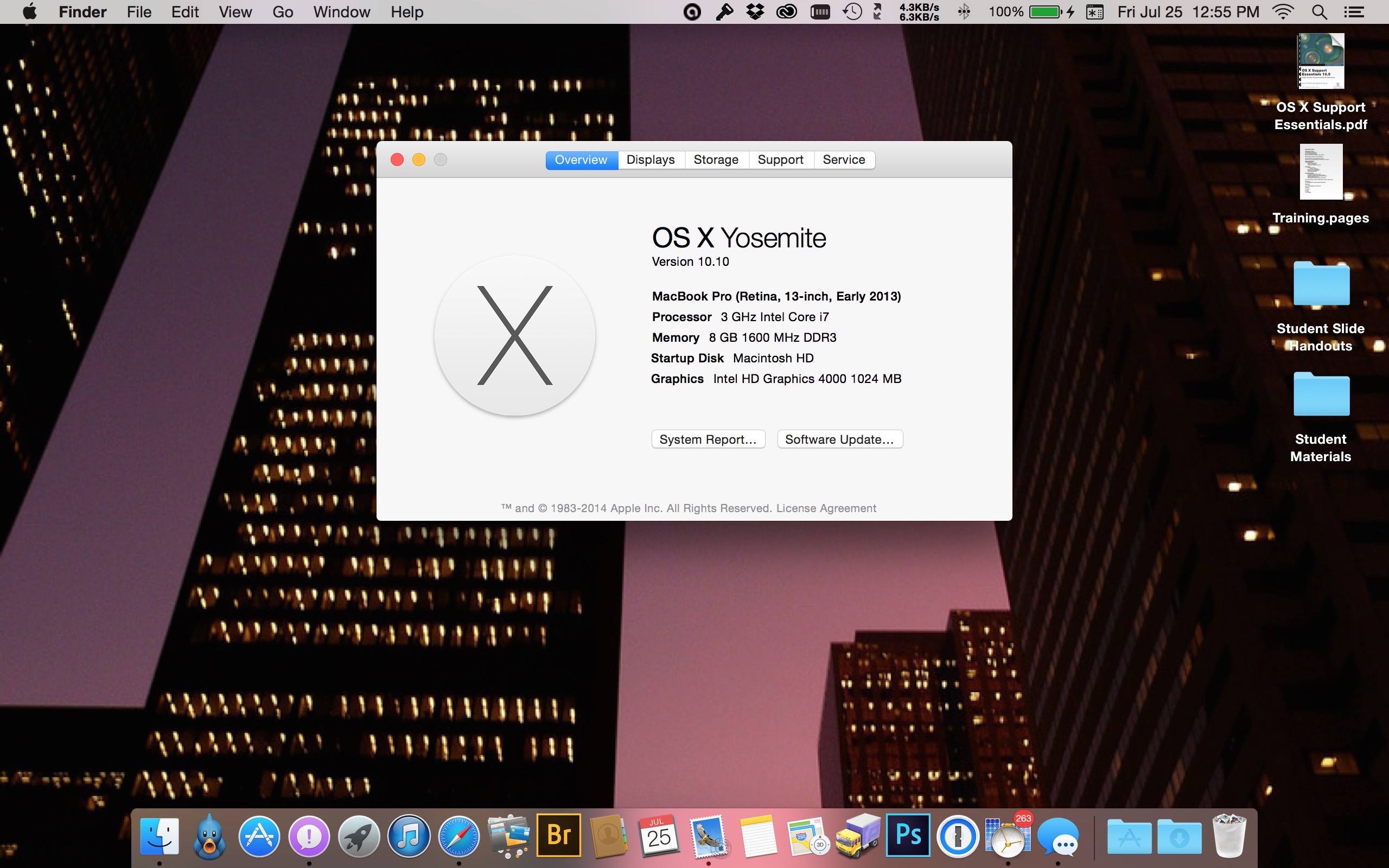
And so far, so good. A few little glitches here and there (all of which I’ve dutifully reported back to Apple) but overall Yosemite has been much more stable than I’d anticipated it would be.

The biggest problem I’ve encountered has been the spontaneous dropping of the connection to my Bluetooth mouse and the subsequent refusal to reconnect, requiring a complete reboot. I’m not a hundred percent sure this wasn’t a problem with the mouse itself, because it the poor thing was four years old and this behavior had been happening occasionally under Mavericks, but to rule out the mouse itself we bought a new one and the problem has disappeared for the most part.

Other issues have been mostly graphics related: items not aligning properly, text overshooting other elements in windows or being cut off, inconsistencies in what is translucent versus what is not from application to application; things that don’t prevent me from productively using the OS, but definitely need to be addressed before this is shipped.

In short, I’m still very impressed what Apple has done here.

Amen!

“For everyone who hates Yosemite, I have a perfect solution for you. Don’t upgrade and don’t complain. This is the new interface, so accept it or keep the version you have. It’s hard to believe that some of you are arguing because some people just don’t like Apple the way others think they should. It doesn’t matter how long or how short we’ve been using OS X. We’re here to appreciate the progress and submit constructive feedback directly to Apple whenever appropriate.” ~ DaJoNel at the MacRumors Forums

So This Happened

After spending most of the afternoon attempting to download the installer, it finally completed without error.

I set up a separate partition on my hard drive and installed it.

Very pretty. “I love what you’ve done with the place.”

After about an hour, I got bored. There isn’t much I could do with it, because I only allotted a 60GB partition, and while I might’ve been able to reinstall all my applications, it definitely wouldn’t hold all my data, and frankly I just couldn’t deal with all that bother anyway.

I have too much on my internal drive to just split it down the middle and restore everything from Time Machine, so I decided to load it on an external drive.

That worked fine. It was impossibly slow, but I verified that everything worked.

After creating a complete backup of the existing internal Mavericks drive, I threw all caution to the wind and ignoring all published warnings, I then loaded Yosemite on the main drive.

So far, so good. The only issue I’ve run into is that the GUI interface of my VPN service didn’t work. That’s not a big deal, as I was able to set up a direct VPN connection in the OS.

It’s Only a Matter of Time

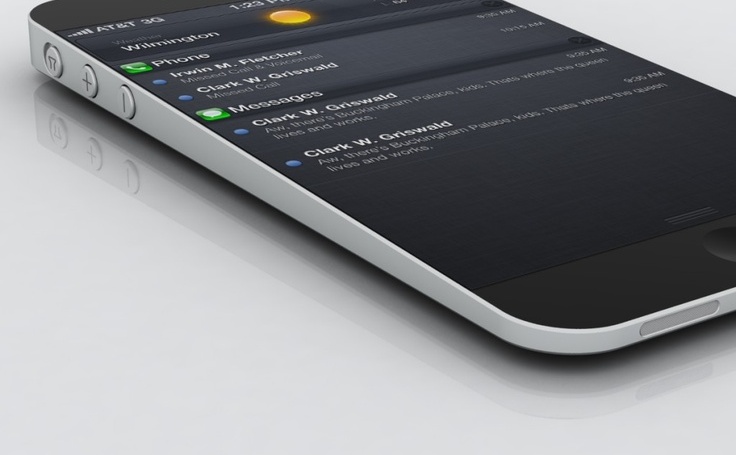
The rumor mill has been abuzz about the expected iPhone 6 supposedly coming out sometime this later year. Personally I don’t care about these rumors one way or another because I learned long ago that the majority of them are complete bullshit—as exciting and inspiring as they may be. I only need to look back a couple years before the introduction of the iPhone 5 to see images of “radical” redesign. My favorite was a wedge-shaped phone similar in design to the MacBook Air:

 I was sorely disappointed when that did not come to pass. So I have no faith in any of the admittedly beautifully rendered speculations on what the next phone will look like. It is what it is, and we’ll all see it when the time comes.

One thing I am hoping for is a 128GB capacity option—and that’s for one reason only: music.

My iTunes library is currently hovering around 100GB and I would love to have any of it available on a whim, instead of having to manually shuffle songs in and out of my current phone. Apple hasn’t updated the iPod classic (160GB) in years, so a device of any kind with this capacity is overdue.

Of course with their current focus on the cloud, I’m sure they’re simply hoping that those of us with huge music collections will just subscribe to iTunes Match and have all our music stream.

All well and good, except I (and I suppose many others) have hundreds of songs that aren’t available in iTunes; songs lovingly ripped and edited from the original vinyl. Plus, why should I have to pay again for access to things I already own?

Anyhow, that’s not really the thrust of this post. “It’s only a matter of time” refers to the eventual day that Apple puts out a much-rumored “iPad Pro,” a device that will finally be able to replace the average person’s laptop in its entirety. 256GB flash storage? Why stop there? Let’s go for 512GB or 1TB. I know it’s not economically (or physically practical) to create this kind of device today that will be as thin and light as the current iPad, but a few years out? We’ll all be laughing at the ancient relics with “only” 128GB of internal flash storage.

It’s said that the majority of people—even those of us who own an iPad in addition to a laptop—have not given up on our laptops completely is that while consuming content from a tablet is its primary attraction, it’s still much easier to create content on a laptop (or full-blown desktop) than it is on an iPad…although, again, I’m sure it’s just going to be a matter of time until the available software tools and hassle-free connections to multiple external monitors also make that a moot point.

Obviously, this won’t happen overnight. Nor do I expect laptops to be abandoned in 2, 3, or even 5 years down the road. But a decade from now? I fully expect the dominant platform will be tablets in one form or another.

On the Subject Of Everyone Bitching About Battery Life

It seems that every time Apple updates its iOS, People With Very Important Opinions© start bitching about how iPhone battery life has taken a nosedive. I have to laugh because none of these very important people seem to realize that when a new OS comes out, people initially use their phones more to explore the new OS.

So of course your battery life is going to go down!

Dear iPhoto…

I want to like you. I want to use you. I really do. But I just don’t understand you. Maybe it’s because you’re too easy, and after decades of manually sorting and renaming my photos into folders that are just so, I simply can’t wrap my head around that simplicity.

Yeah, I get that that you’re basically just one big database, and that anything I do inside you leaves my original images “on the outside” untouched. But if I want to use an altered photo from the database I have to export it, essentially creating a duplicate image. WTF? Other than from a safety standpoint of leaving all your original items untouched, what’s the point? For me it’s a bunch of extra steps that provides no benefit whatsoever.

I already have everything anal-retentively sorted and named inside [the admittedly huge steaming pile of shit that is] Adobe’s Bridge, and all my editing is done either with Photoshop or a quick-n-dirty editor called Flare, so even your photo manipulation facilities leave me unmoved.  And even if I did use them, we’re back to the whole having-to-export thing.

My workflow is basically when I snag a new image off the internet it first goes into a “Downloads” folder to later get renamed and shuttled off to its respective folder. Importing photos from my camera works basically the same way. In that case, I used to have folders by year, with individual dated subfolders for each “event” as you like to call them, where I’d put the images, but I blew away that system—which became too anal even for me—a while back and now just dump everything into yearly folders. I figure since everything is time stamped already,  I don’t really need to break things down any further.

I suppose that if I’d started my photographic career off with you initially and had never been exposed to ThumbsPlus (that I curse on a daily basis for still not having a Mac version available) or Photoshop, we’d be having a marvelous love affair right now, but importing 80,000+ images (and no, that’s not all porn!) after the fact and then basically recreating the folder structure I already have and use seems a huge waste of time.

I do understand a few of your benefits, most notably the ability to create virtual folders where disparate images can be grouped. I like being able to create a “Wallpaper” folder, and throw images from a dozen different albums into it. I find that useful. You’re also great for making Photo Books. But other than that, I just don’t see how you can fit into my workflow without doubling the number of steps I need to perform to get from Point A to Point B, and ain’t nobody got time for that!

Never Again

Tonight I thought I’d install Windows via Bootcamp onto my Mac so I wouldn’t have to bring that stupid HP laptop home from work on the rare occasions I needed to.

What a mistake that was.

Yeah, it installed easily enough, and surprisingly, it actually worked. That is, it worked until I downloaded 135 software updates and after rebooting, the network adapter disappeared.

It’s shit like this that caused my initial move to Apple back in 2009.

Fuck you, Microsoft. Windows will never be installed on anything I own ever again.

And This…

…is just one of many reasons I love Apple.

CEO Tim Cook said Friday at the company’s annual shareholder meeting that there is no room at the table for climate deniers.

The National Center for Public Policy Research, a D.C.based conservative think thank, arrived at the meeting demanding that the board not pursue any environmental initiatives that hurt the company’s bottom line. The group’s proposal would have required Apple to disclose the costs of such initiatives and to be more transparent about its relationship with “certain trade associations and business organizations promoting the amorphous concept of environmental sustainability.”

Cook’s response to this squawking was priceless: “We do a lot of things for reasons besides profit motive,” and reiterated Steve Jobs’ founding vision for Apple: “We want to leave the world better than we found it.”

And if the NCPPR wasn’t unhappy enough with that, he went on, saying they could just leave. “If you want me to do things only for [return on investment] reasons,” he said, “you should get out of this stock.”

Oh sah-nap!

Needless to say, the NCPPR did not take the rejection well, throwing a tantrum by tossing themselves on the floor, stomping their feet and threatening to hold their breath until they turned blue…like typical toddlers.

Dear Apple, FIX YOUR SHIT

Stolen, but reflects my own feelings to the letter:

Okay, so iOS 7.0.6 happened – the short version is that Apple broke SSL. Oops. Oh well, it happens, apply the patch yadda yadda yadda.

What didn’t happen was the corresponding OS X patch. At least not yet.

WHAT THE EVER LOVING F**K, APPLE??!?!! Did you seriously just use one of your platforms to drop an SSL 0day on your other platform? As I sit here on my mac I’m vulnerable to this and there’s nothing I can do, because you couldn’t release a patch for both platforms at the same time? You do know there’s a bunch of live, working exploits for this out in the wild right now, right? Your advisory is entirely focussed on iOS so we know nothing of OS X yet (other than the fact that the exploits work) – could you tell us what in OS X is vulnerable? Is mail.app vulnerable? Should I be worried about malicious SSL/TLS mailservers? How about your update system itself – is that vulnerable?

Come the hell on, Apple. You just dropped an ugly 0day on us and then went home for the weekend – goto fail indeed.

FIX. YOUR. SHIT.

Soon.

Please?

Love and hugs as always,

And Here I Thought It was only Jobs Who’d Taken LSD…

“There’s nothing to keep Apple out of the Android market as a secondary phone market. We could compete very well. People like the precious looks of stylings and manufacturing that we do in our product compared to the other Android offerings. We could play in two arenas at the same time.” ~ Steve Wozniak, obviously tripping on something

Preach!

“Before we go any further, I’m sure there are plenty of readers who have Genius Bar horror stories, or who have experienced less-than-stellar customer service, but going off of my own experiences, I can safely say I’ve never had a better experience getting a product repaired or replaced than at an Apple Genius Bar. The Genius Bar represents the Apple we all romanticize, the Apple we imagine has our backs whenever we need it. The one that says, ‘We’re with you every step of the way, even if you stumble sometimes.’” ~ Harry C. Marks

(Go read the entire article. It’s well worth it.)

Preach!

Words I could’ve written myself, from Adrian Kingsley-Hughes at ZDNet:

“These are words I never thought I’d be writing.

After more than two decades of being a dedicated Windows power user, someone who over that time has installed and supported countless systems running versions of Windows spanning from 3.0 to 8.1, I’ve now all but given up on the platform.

It might sound odd, but writing these words actually makes me sad. I devoted my 10,000 hours to mastering the platform, plus thousands more, and got the point where there wasn’t a file, registry entry, or command line trick that I wasn’t familiar with.

I knew how to make Windows work.

But now, other than for test systems and virtual machines, I carry out my day-to-day work on a variety of OS X, iOS and Android systems. I barely give my Windows PC systems a second glance. My primary work system is a MacBook Pro, and in the ten months I’ve had it it’s flawlessly done everything I’ve asked of it, from run Microsoft Word to render 4K video. I’ve lost count of the number of notebooks I’ve owned over the years, but this MacBook Pro is, by far, the most reliable system I’ve owned, and I put part of that down to the fact that it doesn’t run Windows.

Sure, I’ve downloaded and installed Windows 8.1 onto a number of systems for testing, and I’ve put an awful lot of hours into getting to know this latest release of Windows, but I see nothing in this new version that excites me sufficiently to tempt me back into the Microsoft ecosystem. If anything, the effect has been the exact opposite, confirming my belief that parting ways with Windows was the right thing to do.

So what’s bought me to this point in my tech career?

Support fatigue

I’ve spent almost my entire adult working life involved with PCs, and the more PCs you are around, the more sick and dying PCs you encounter. And I’ve encountered a lot.

I’ve also cajoled and coaxed countless ailing systems back to life, but during that time I’ve come to realize how fragile the Windows operating system is, and how something small and insignificant as a bad driver, incorrect settings, or the stars being in the wrong position can bring a system to its knees, and result in hours of work searching for a solution. That’s great if you’re being paid by the hour to solve PC problems, but if your dealing with your own systems, and you have better things to be doing with your time, then you want to get them up and running as fast as possible so you can get back to real work.

Troubleshooting is costly, time-consuming, and frustrating, and while I once used to relish the challenge, I now try to avoid it whenever possible.

Of all the desktop operating systems that I’ve used, the modern Windows operating system is by far the most fragile. It didn’t used to be like that. I had Windows NT 3.5/40 systems, and some Windows 2000 machines that were rock solid. Partly this increase in fragility is down to the vast ecosystem of hardware and software it has to support, and partly it is down to the years of legacy that each version drags behind it. But part of the blame also lies at Microsoft’s door for not putting enough effort into hardening the system, reducing the effect that fault – in particular software faults – have on the system, and providing better information when things go wrong.

Adding a 🙁 to the Windows 8 BSoD screen isn’t enough.

Windows systems keel over, and most of the time the only clue you have as to why is an ambiguous error message, which may or may not be a red herring. This sends you to Google – or Bing – in search of others before you who have suffered a similar problem, and whom you hope may have found a solution, which might be in the form of an updated driver, a registry tweak, command line incantation, or patch.

Sometimes you get lucky. Other times you have to try a number of things before you’re successful. And sometimes you end up deciding that it’s quicker to nuke the system and start from scratch.

And all the while I’m doing this, precious time is slowing through the hourglass.

The shift to post-PC devices

Another reason why Windows has been relegated to the sidelines at the PC Doc HQ is the proliferation of post-PC devices such as smartphones and tablets.

Now I’ve been using mobile devices for years, and remember Windows CE and the like running on devices with exotic sounding names such as iPAQ and Jornada (remember those?), but these devices were, without a doubt, companion devices. Basic operations such as installing software or moving data required a PC, and so these devices spent a lot of their lives tethered to a Windows PC.

Then Apple changed everything, first with the iPhone, and then with the iPad. Here were devices that were standalone, leveraging over-the-air software downloads and updates, and cloud storage.

I found that I could do more and more with less and less. Tasks that once required a full-blown desktop or notebook PC could be carried out faster and more efficiently on a smartphone or tablet. Unless I want to use full-blown applications such as Microsoft’s Office or Adobe’s Creative Cloud suite, then I can make do with post-PC devices. What’s more, I can usually get things done faster since I’m not tied to my desk.

And the great thing about these devices (and I’ll throw Android in here with iOS) is that they’re there when I need them. I’ve had an iPhone and an iPad for years, and I can only remember a couple of times when they’ve let me down.

My experience of Windows on tablets closely resembles that of my ZDNet colleague James Kendrick. Bottom line, they let me down too much to want to bother with them. Why would I trade a reliable iPad or Android tablet for an unreliable Windows 8.1 tablet? Why trade a tablet that just works for one that regularly sends me on quests, roaming the Internet looking for the right elixir to fix the system?

Any hopes I had that x86 versions of Windows would be more stable on tablets have gone. In fact, in my experience, the user experience is worse. Sure, most of the time the problem comes down to a rogue drivers or a configuration thrown out of whack, but a problem is still a problem, and these are problems I don’t experience with iOS or Android.

Bill Gates was right, there was a market for tablets. Unfortunately, most of those tablets would be powered by operating systems made by Apple and Google. But then, Apple and Google didn’t try to shoehorn a desktop operating system onto tablets.

Windows RT is certainly a better choice for tablets, but that’s because what you have is the illusion of Windows, rather than the real thing. If Windows RT had come out at around the same time as the iPad, and the software ecosystem matured at the same pace, then Windows RT would be a real contender, but as it stands right now there’s little reason to choose it over iOS or Android.

Unless, that is, you want something that look like Windows. Which I don’t.

The increasing irrelevance of the operating system

Once upon a time, the operating system was the platform on which people ran applications, but as more and more local applications have been replaced by services running on remote web servers, increasingly the browser has replaced the operating system as the primary platform.

Twitter, Facebook, Gmail and countless other web-based services look the same whether I’m using Windows, OS X, or even Linux. On smartphones and tablets, I have the choice of accessing most of these services either through a web browser or a dedicated app.

It doesn’t matter what operating system is running my browser, so I’m free to choose the platforms that give me the least headache.

Change for the sake of change

One of the biggest problems I have with Windows is the way that it inflicts change on the user for no logical reason.

For me, Windows 8 was the peak of “change for the sake of change,” removing the Start Menu and pushing the Desktop into the background. Yes, I understand why Microsoft needed the Start Screen (because the Start Menu would be too cumbersome for tablet users), and yes, I understand that Microsoft wanted to give apps center stage, but for hundreds of millions of users running Windows on a desktop or notebook PCs, these changes did nothing but hurt productivity.

Compare this to OS X or even Linux distros. Here you feel a progression from one version to the next. Yes, sometimes there are changes that are disliked, but overall there’s a smooth progression from one version to the next. Jarring changes are best kept to a minimum because they have an adverse effect on productivity, adding unnecessarily to the learning curve.

Microsoft backpedaled on some of these changes with Windows 8.1 (which must have been a pain for users who had gone to the effort of learning how to use Windows 8), but for me the damage was done. It’s clear that Microsoft is going in a direction that’s incompatible with the one I want my operating system to go in.

No appreciation of power users

Microsoft’s decision to end the TechNet program, a service which gave power users, enthusiasts, and those who’s job it is to test and support Microsoft products cheap and easy access to products, is a strong indicator that the company no longer values what people like this bring to the platform.

Windows is now the expensive option

Windows is now the only operating system I use where I have to pay to upgrade it.

While I don’t begrudge paying a fair price for something I need, paying big upgrade bucks for something I can do without makes no sense. PCs easily outlast the lifespan of the Windows operating system, and the idea of paying almost a hundred bucks per system to keep it updated is hard to stomach when it doesn’t bring me any tangible benefits.

Going the mac route might seem like an even more expensive option, but having owned a number of systems, including the MacBook Pro that that become my go-to system, the additional cost of the hardware (plus the additional AppleCare warranty) is offset by the fact that these systems have given me months, and in some cases years, or hassle-free use. I’ve not had to mess around with drivers.

I’ve not had to go digging through the configuration settings. I’ve not had to surf the web looking for solutions to obscure error messages.

Shift to console gaming

I used to love PC gaming, but then I got my first console.

While the graphics don’t match up, and the gamepad is no substitute for the keyboard and mouse, the years of hassle-free gaming that a console offers, free from driver and patch headaches, more than makes up for the deficiencies. Not only that, but when I consider how long I’ve had my Xbox 360, It’s outlasted several gaming PCs, which has saved me a ton of cash.

Pick the game I want, insert the disc, and BOOM! I’m playing the game in seconds. No patches to download and install, no  graphics card drivers to mess with.

The bottom line

The bottom line is that outside of a few edge cases, Windows isn’t for me. If it works for you, then that’s great. Stick with what works for you. I for one certainly won’t sneer or look down on you or go all fanboy.

After all, I remember – with fondness, and more than a hint of sadness – a time when it worked for me.

Personal preferences are, well, personal.

Can I see a time when I might go back to Windows? Maybe, I’m not ruling anything out, but for the time being, I see Windows playing a smaller and smaller part in my day-to-day computing.”

 

A Short Review of OS X Mavericks

Because I know those of you who care about this shit have already read dozens of other reviews from people who actually get paid for posting their opinions online.

First off, it works. In my opinion, that’s the best compliment any new OS can receive. In my week-long experience with it so far, nothing’s broken. Unlike Windows, which pretty much requires any OS upgrade to be a “clean” install if you don’t want issues, Mavericks just laid over Mountain Lion and came right back up. Which is exactly what I have come to expect from the folks in Cupertino.

There are hundreds of changes, but on the surface it looks pretty much the same as Mountain Lion. There are few subtle visual and functional tweaks here and there, but if you weren’t looking for specific things and just sat down in front of two machines running the different OSes side by side, they’d look almost identical.

I find one of the big advertised features—Tabs in Finder—helpful, because the Finder was one of the things I hated most after switching over from Windows four years ago. Copying and moving files is so much easier now, but still not as easy under Windows. (Did I just say that?) Why there still isn’t an option to simply display a tree structure at the left of the Finder window still amazes me. (If you absolutely must have a Windows Explorer-like file manager, check out MacIntosh Explorer. The program is a little long in the tooth, isn’t optimized for retina displays, and occasionally has issues (it’s no longer in active development), but if you want immediate access to all those files and folders that Apple thinks you don’t need to see without having to go to the Terminal to manually un-hide things, it might be what you’re looking for). I use it only rarely, but when I need to, it does the job with a minimum of fuss.

I haven’t used dual monitors in nearly a year, so I haven’t had a chance to check that bullet feature out.

Likewise, I use 1Password as my password keeper, so iCloud keychain is superfluous to me.

I’m happy to see the faux leather and stitching finally gone from Calendar and Contacts. Also gone is the yellow ruled paper from the Notes program and the gray linen background from the log-in screen.

Having Apple Maps in iOS is pretty much irrelevant to me, although I do keep the icon on my dock in case I just need to look up a quick address. As for the 3D flyovers and the satellite imagery, the visuals aren’t any better than they are on iOS. “Only as good as the data” is still true here. Since they now have Maps on the desktop and Find my i-Whatever available through iCloud, I’m hoping that at some point they integrate Find My Friends into OS X as well, although at this point I’d be just as happy if they simply ditched the stitched leather interface of the program in iOS and brought it in line with the rest of Apple’s iOS apps.

I don’t use iBooks, so that was removed from the dock within seconds of the post-upgrade reboot.

The only things that don’t work for any more are two third-party screensavers (Fliqlo and Colour Clock) I had installed, and that’s because they relied on Flash in order to run. And if I don’t absolutely need to have that resource hog installed, I won’t install it. Not a huge loss; I’ve found suitable replacements.

I also received the iWork and iLife updates. Unlike a lot of the fanboys, I’m not grousing about the changes they made to the iWork apps—probably because even after four years I have yet to fully embrace them as my main productivity tools. Believe me, I’ve tried on more than one occasion to do it, but with twenty years experience under my belt, whenever I need to sit down and do real work, I fire up Word and Excel. As much as I have come to despise all things Microsoft, sometimes it’s easier to just go with what you know.

So that’s my two cents. As I said, I’m sure there are hundreds of improvements behind the scenes, but nothing that has really leapt out at me or intruded upon my consciousness. I guess that’s a good thing, no?


Free? Are They Insane?

It’s funny…Ben and I were discussing this a few weeks ago, wondering out loud if Apple would sell OS X Mavericks at the same—or even a lower—price than they did with OS X Mountain Lion. We even joked that they’d give it away for free.

Even with my severely constrained cash flow at the moment, I had mentally set aside $20 (the price of Mountain Lion) to get the upgrade because, well…priorities!

Imagine my “surprise and delight” this morning then—while watching Apple’s Keynote—when they announced the OS upgrade would be absolutely free.

Are they insane? Or have they just caused a few more worry lines to appear on the faces of Microsoft executives?

I can already hear the headlines. “APPLE IS DOOMED! THEY KNOW NO ONE WOULD BUY THE UPGRADE SO THEY’RE GIVING IT AWAY FOR FREE!”

Uh. Yeah. About that…

I’d write more, but the download is almost finished.

Bullshit

Like millions of others, I upgraded to iOS7 last week. I generally like it, but it’s taken me only a few days to discover a HUGE fail on the part of Apple and the bloom is definitely off the rose because of it.

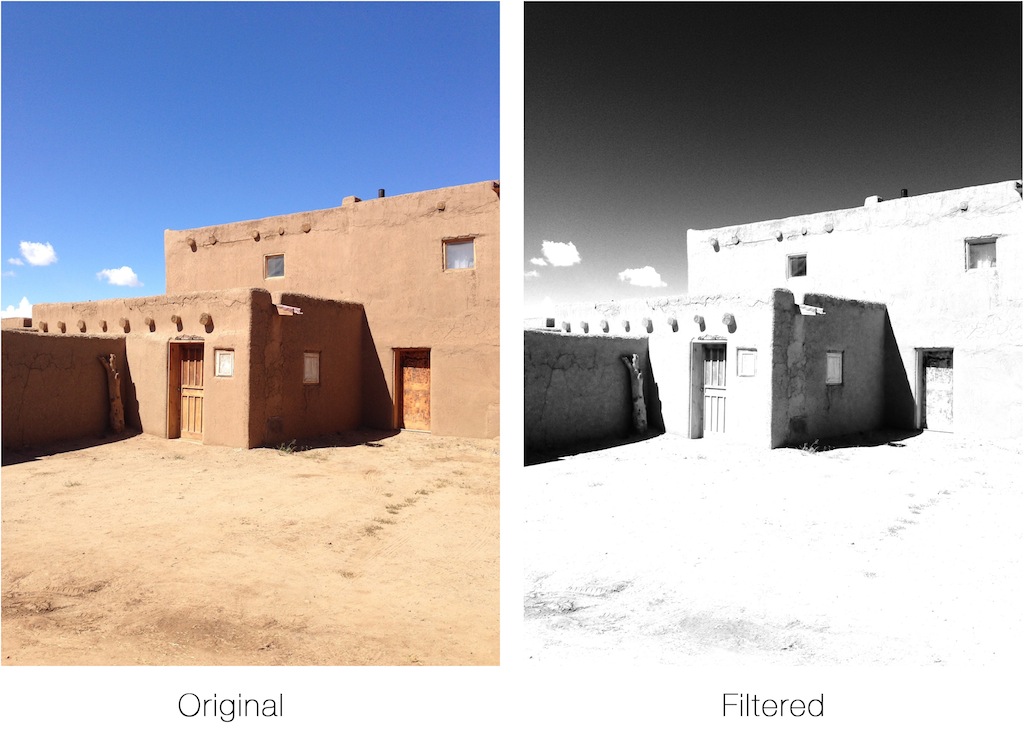
The built in photo app now allows you to apply filters to your photos, either when you take them or after the fact. Pretty cool, right?

The problem is that when you transfer them off the phone using Apple’s own Image Transfer application on the Mac (or through iPhoto), all the filter information is stripped and you’re left with only the original photo.

WTF?

And moving the pictures back onto the phone does not restore that lost data.

So all of the original beautifully filtered photos that I took on our trip to Santa Fe are gone (except for the ones I uploaded to Instagram), and the only way I was able to get them back is to re-import them to the phone, reapply the filters, and then email the filtered photos back to me. Yes folks, email.

I would expect this kind of crap from Microsoft, but not Apple.

And did I mention that when you do this you don’t get the full resolution photos, even though they’re being selected to be sent as full size? Nope, they’re only 62% of the original resolution.

This is bullshit.

And Apple Wins Again

Just amazing.

I tried catching this scene earlier today using my old “prosumer” (not my digital SLR) Sony digital camera. It failed miserably—by not only refusing to stop the moth’s wings in flight, but also in failing to capture the deep purple color of the flowers. As I was about to give up and walk off, I returned with my iPhone.

MIND. BLOWN.