Rant incoming.
It wasn’t the “liquid glass” user interface per se. It wasn’t the overly rounded corners on every. damned. window (annoying, but not a total deal breaker). It was the fact that so. much. stuff. was broken. What am I talking about? MacOS 26, aka “Tahoe” of course!
A few days ago I reached my breaking point with things spontaneously opening, Safari refusing to load websites, and numerous other glitches too numerous to mention. As much as I knew it was going to be a pain to go back to Sequoia, I knew it had to be done to maintain my sanity. My only real concern was that when I tried to downgrade another Apple OS many years ago, I learned that with each OS upgrade, Apple also changed the mail database structure, making it impossible to open any locally stored mailboxes once you’ve downgraded to an earlier version. Throwing caution to the wind, however, after verifying the previous night’s full-disc backup was good and creating a Sequoia installer USB, I erased the main drive and set about reinstalling the previous O/S.
After I got Sequoia up and running, I did not use the Migration Assistant to restore all my files and settings from the backup because I didn’t want to transfer all the extra, obsolete garbage that had accumulated over the past several years and O/S installations. So I started reinstalling applications and transferring everything manually.
I was about a quarter of the way through it when I thought, “What if there’s nothing wrong with Tahoe, but rather it was just dealing with all that detritus from previous installations?
So I booted into the recovery partition, verified that “Reinstall Tahoe” was an option (since my previous Tahoe installation had overwritten the recovery partition), and went ahead and erased the drive and started fresh. I booted back into the recovery partition and this time, instead of being greeted with the “Reinstall Tahoe” option, the only thing I had available was “Reinstall Sequoia.”
What the fuck?
Since I had little choice at this point but to reinstall Sequoia again in order to install a fresh copy of Tahoe, I shut down, inserted the Sequoia boot USB (because it would be quicker than downloading from the internet, which is what that recovery partition option would do), rebooted, and loaded the O/S again from the USB. This still wasn’t ideal since in order to get a clean Tahoe install I would have to install over the clean Sequoia install.
Now if I’d been thinking (which clearly I hadn’t been), I would’ve created a Tahoe USB installer which would have allowed me a new pristine installation of Tahoe to test my theory. But I wasn’t. And I didn’t.
TLDR: After nearly 48 hours, I finally have a functioning system again. At one point yesterday I told Ben, “I quit Windows because of it taking an entire day to rebuild and restore a PC!” I finally gave up on the Tahoe experiment and late last evening I was finally back up and running with a clean install of Sequoia. Everything I tested worked (with a couple notable exceptions below), and in some cases, worked in ways they hadn’t worked in years. (Did you know you were supposed to get audible notifications when new mail arrived?)
Speaking of mail…my worries about the mail databases was unfounded. I was able to import the original mailboxes without any issues popping up. So that had changed since the last time I attempted it. (Mountain Lion or Mavericks as I remember.)
I realized this morning I’d transferred all my music and the associated library file but had failed to actually start up the Music app to verify that everything worked. I did that and it balked at the library file. “Cannot use library file because it was created by a later version of MacOS.”
Fuck me.
I’d dodged that bullet with my mail files, but apparently I wasn’t going to be so lucky with my music collection. Visions of me having to reassign thousands of pieces of album art to my collection flashed before my eyes. But what was I gonna do? I went ahead and imported all the files and afterward was pleasantly surprised to see that all but a few dozen recordings were missing art. That I could live with and correct as time allowed.
The other issue that I’m still dealing with is XNView (the application I started using several years ago to catalog and view images when Adobe Bridge started glitching too much) can no longer preview or internally view .pdf files. A prerequisite for this functionality is that Ghostscript is present on the system, so I dutifully installed GS via Homebrew. Despite it being installed, XNView refuses to acknowledge its presence. XNView also insisted on starting fresh when I opened it, even though the configuration files were transferred from my backup. Normally this wouldn’t be horrible because I can recreate all the customization, but I also lost the markers that I’d assigned to individual images to indicate if I’d blogged them, and no matter what I do I have been unable to bring them back.
So if you start noticing duplicates on VoenixRising, you’ll know why.
If I start the application via the terminal everything works, so that tells me Ghostscript is installed correctly. The path to Ghostscript is in the path (I think. Setting paths in MacOS is not anywhere near as simple as it is in Windows), but when starting XNView directly, it’s not finding it.
So this is what I’ve been banging my head against all afternoon, with no resolution in sight.
Oh…and for some reason, two of my contacts absolutely refused to sync from iCloud back to the Mac—but I was able to recreate them locally.
So that’s where we stand this evening. Good, but not great. If there are any Mac users out there who are familiar with setting paths (or getting Ghostscript to be recognized by programs that need it), I’d love to hear from you.























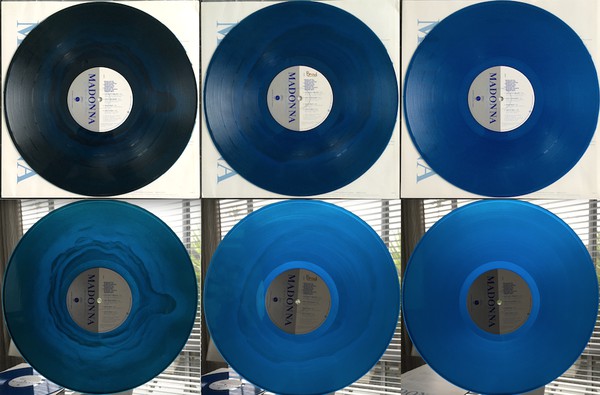 “Does anyone know why there were such variations in the colour of the Vinyl in the Aust edition? I have one that when not held against the light almost looks black and has a marble effect, and another that is perfect blue. Happy to post a pic if someone could help.”